Bancheng / AI chat
An AI chat assistant that only says what you taught it
A customer asks "what time do you close?" or "is this in stock?" at midnight, and doesn't have to wait for you to wake up. But the assistant won't invent an answer it doesn't have.
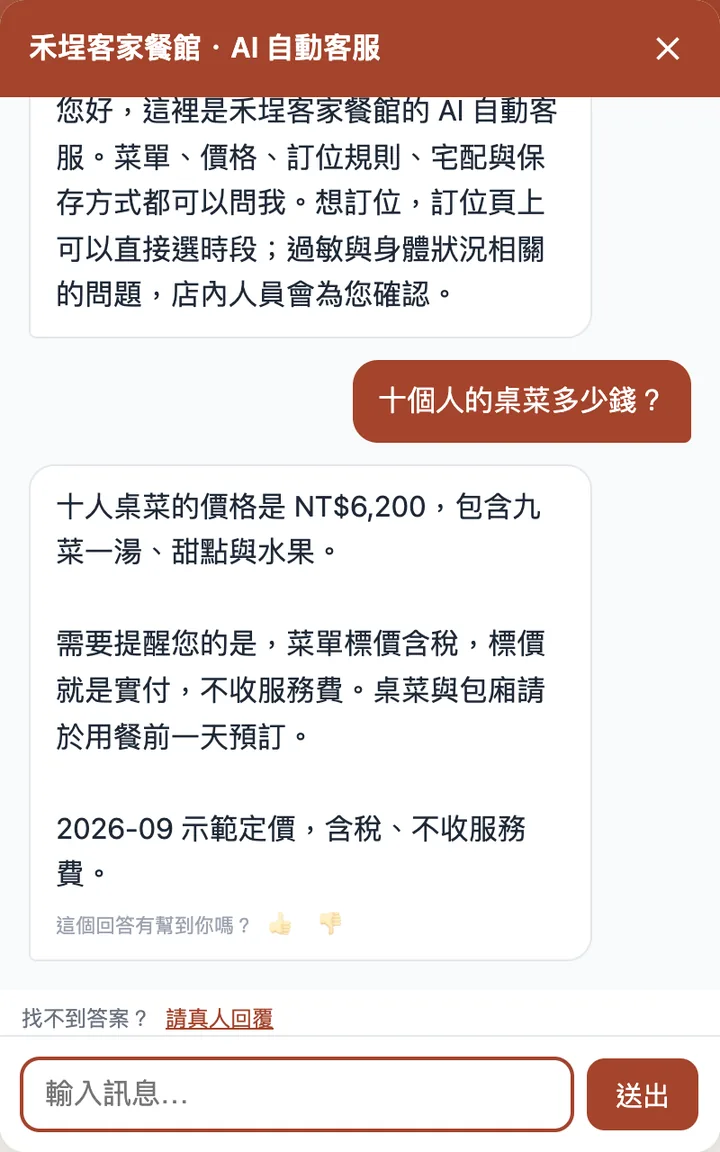
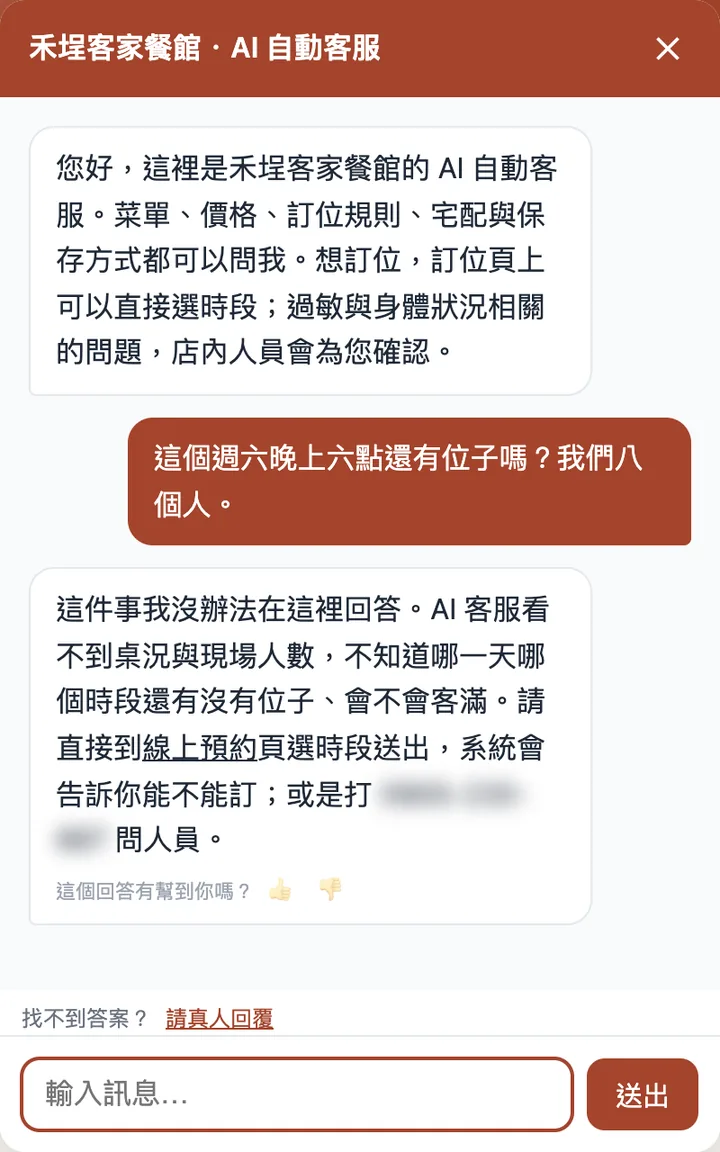
Below is the assistant on one of our demo sites, a fictional Hakka restaurant, captured live and unedited — only the demo phone number is blurred so nobody dials it by mistake. The demo is in Traditional Chinese; the assistant replies in whatever language the customer writes in.
What it reads
Your knowledge base: opening hours, price lists, FAQs. Type it in, upload a file, or give it a web address to read. It also reads what's already on your website, so you don't have to enter that twice.
What happens when it doesn't know
It says it doesn't know, then asks the customer for their contact details or hands the chat to a person, using the wording you chose. That matters far more than being able to answer everything — the price of a made-up answer is you, apologising to a customer in person.
You can rewrite that "I don't know" message yourself. Tone, warmth and extra rules are all set in the dashboard.
A human handoff means a real person
When a customer taps "Talk to a person" in the chat window, you get an email, the dashboard menu shows a red dot, and even the browser tab title shows how many people are waiting — because the dashboard is rarely the tab you're looking at. If you have developers, you can also use a webhook to send the alert into your own team chat.
Email and red dots only help if you happen to be looking. Add the dashboard to your phone's home screen and your phone gets a notification whenever someone asks for a person — no need to keep the dashboard open. iPhone and Android do this differently; open the dashboard on your phone and it shows you the steps for yours. On iPhone it must be added to the home screen first to receive notifications at all — that's an iOS rule.
What you type in the dashboard appears in the same chat window the customer is already using — no need for them to leave an email and wait. The chat shows clearly that a person is now replying: customers have a right to know who they're talking to.
While you're handling the chat, the AI stays quiet. When you're done, hand it back and the AI carries on answering. If you go quiet for 30 minutes without replying, the AI picks the conversation back up so the customer isn't left waiting.
Once you've taken over, both sides can send photos and files — a broken part, a size chart, a quote — the things that take forever to describe in text.
Chat with customers in languages you don't speak
After you take over, switch on translation: the customer's messages arrive in your language, and your replies go out in theirs. Their language is detected from what they type, so you don't have to ask first — asking would mean picking a language, which is the very problem you're trying to solve. If they switch languages halfway, the translation follows.
The original text is always there, so when something is mistranslated (names and model numbers are the usual victims) you can see what they actually wrote. Each translated message counts as one conversation from your quota; switch it off whenever you like.
For customers who don't know what to ask
When the chat window opens, a few ready-made questions are there to tap. They aren't random: at first the system suggests them from your products and articles, and once enough customers have asked, it switches to the questions they actually asked — what customers say is always more accurate than what we'd guess. You can also pin a few of your own.
You see the questions it couldn't answer
Every question the assistant declined goes on a list. That list is what your website hasn't covered yet — add an answer right there, and the next person who asks gets it.
Every conversation is on record
Each conversation and every form a customer submits can be found in the dashboard, and exported. When customers keep asking the same thing, they're telling you what your website is missing.
Works on the website you already have
Copy a snippet of embed code into your existing website and a chat button appears in the bottom-right corner. Its colour and icon can match your design.
FLYMON uses it exactly this way: they built their own website, and not a word of it changed — they only added the embed code. The knowledge base is maintained in our dashboard and their site is untouched. Try the chat button in their bottom-right corner.
LINE, Facebook Messenger and Instagram DMs too
Not every customer comes to your website to ask. Connect your LINE Official Account, Facebook Page and Instagram DMs, and messages there are answered by the same assistant: one shared knowledge base, product lookups included, customers' photos visible in the dashboard, and human handoff on the same Conversations page.
You connect your own accounts — customers follow your official account and see your shop's name and profile picture, which can't be shared with anyone else. Each reply counts as one conversation from your quota, just like on the website. Messenger and Instagram follow Meta's 24-hour rule: if the customer's last message was more than 24 hours ago, a human reply can't be delivered, and the dashboard flags that message.
How the quota works
Conversations per month: Free 100, Basic 1,000, Pro 3,000, Enterprise 10,000. Your quota runs for a month from your sign-up or subscription date, not from the first of the month — sign up on the 28th and you won't be reset after a few days.
So how long before I can use it?
The knowledge base grows from your existing website and products, so you don't have to prepare a body of training text and hand it to anyone first. How long setup takes goes into more detail, including the cases where we're slow too.
FAQ
How much material does it need before it can answer?
Your business details and a page of common questions are enough to start. It also reads what's already on your website, so you don't have to retype it.
What happens when I run out of conversations?
The assistant stops replying; the rest of your site keeps working. Quotas run from your sign-up or billing date, not the first of the month.
Can I put it on the website I already have?
Yes. Copy the embed code into your existing site and the chat button appears — no need to move your site.
Can it answer LINE, Facebook and Instagram messages too?
Yes. Connect your own LINE Official Account, Facebook Page and Instagram DMs; the same assistant answers from the same knowledge, and handoffs come to the same dashboard. Each reply counts as one conversation.
Does it answer in my customer's language?
Yes. It replies in the language the customer writes in. If your site has an English version, it links to the English pages.